Your Facebook Page Is Not Yours If You Set It Up Wrong

I get this call more than I should.
A business owner rings to say their marketing person has just resigned. The business is fine. The departure is fine. But there is a problem: the company Facebook Page, the one with 12,000 followers and four years of posts, is now inaccessible. The only admin account belongs to the person who just left. And that person, for whatever reason, is not picking up the phone.
This is not a technology problem. It is a setup problem. And it is entirely preventable.
The way most Malaysian SMEs set up Facebook
Here is how it usually goes. Someone at the company, often the owner or an early staff member, creates a Facebook Page by logging into their personal account and clicking "Create Page". The Page now lives under their personal account. They are the only admin. If they leave, get sick, or simply forget the login, the business has no way back in.
Later, a marketing hire takes over. They run ads from their own personal account. The ad account is under their name. The Business Manager, if there is one at all, is connected to their personal account. The business pays the invoices but has no actual ownership of the assets.
This structure works until it does not. The moment that person is unavailable, every door is locked.
What actually owns what
Facebook and Meta operate on a hierarchy of assets. Understanding it takes five minutes, and it changes how you set everything up.
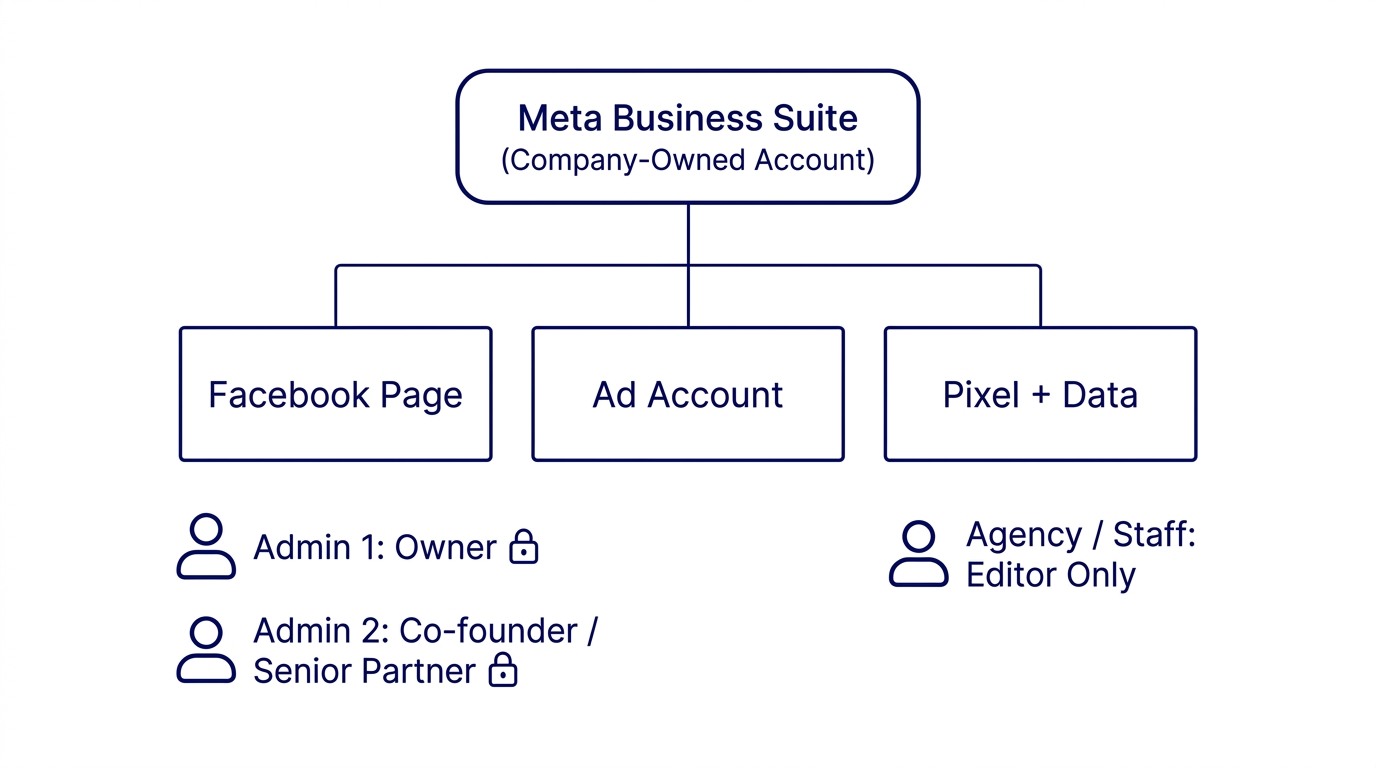
At the top is Meta Business Suite (formerly Facebook Business Manager). Think of it as a company entity that holds all your Meta assets. It is separate from any personal Facebook account.
Under the Business Suite you have Pages (your company Facebook Page, Instagram account), Ad Accounts (where your campaign spend goes), Pixels and datasets, and People with roles on those assets.
The critical rule: the Business Suite itself should be owned by the business owner's personal account, not a staff member's. Assets should be connected to the Business Suite, not to individual personal accounts.
When you set it up this way, you can add or remove staff without losing access to any asset. A staff member leaves, you remove their access. The Page, the ad account, the pixel, all stay with the business.
The two-admin rule
Even with the right structure in place, you need two named admins at the Business Suite level and at the Page level.
Two admins is not redundancy for redundancy's sake. It is a practical hedge against a personal account getting hacked or disabled by Meta, an admin being unreachable during an urgent situation, or an owner being the sole admin and then forgetting their personal account password.
The two admins should ideally be two people whose employment continuity with the business is stable. In most Malaysian SMEs that means the business owner and a co-founder, a senior partner, or a trusted family member. Not the marketing executive. Not the social media agency.
An agency can be given Editor access, which lets them post and run ads. They do not need Admin access, and they should not have it. Admin access is ownership access.
How to audit your current setup
Before fixing anything, check what you actually have.
Go to business.facebook.com. If you see your company name and assets listed there, you have a Business Manager. If you are taken directly to a personal feed, your assets are attached to a personal account and you need to migrate them.
Inside Business Manager, go to Settings, then Business Assets. Check who owns each Page (it should say your Business Manager, not a person's name), who owns the Ad Account (same check), and under People, who has Admin access and what is their relationship to the business.
For each Page specifically, go to the Page itself, then Settings, then Page Roles. Every person listed as Admin should be someone whose departure you can manage. If a former staff member is still listed as Admin, remove them now, not next week.
What to do if you have already lost access
If you have lost access to a Page and the original admin account is gone, the recovery path is through Meta's Business Help Centre. It is slow and not guaranteed, but it exists.
You will need to prove that you are the legitimate business owner. Prepare a copy of your business registration (SSM document), a screenshot showing your physical address matches the Page information, and any invoices or receipts showing your company paid for ads on that account.
Submit a claim at facebook.com/business/help. Meta typically responds within a week. The outcome depends on how clearly you can establish ownership.
Prevention is faster and more reliable than recovery. One hour of setup now saves weeks of back-and-forth with Meta support later.
The access audit as a recurring habit
Once the structure is right, schedule a six-monthly review. It takes twenty minutes.
Check three things. First, are both admin accounts still active Facebook accounts belonging to people connected to the business? Second, has any former staff member or agency retained access they should no longer have? Third, are the Business Suite's payment methods still valid and owned by the business?
The payment method check matters more than most people realise. If a staff member added their personal card to pay for ads, those invoices go to them, not the business. When they leave, the card stops working and the ad account gets flagged.
The setup that protects you
The correct setup is straightforward.
Create a Meta Business Suite at business.facebook.com using the business owner's personal Facebook account. Add the business Page to the Business Suite as an asset. Add the business Ad Account to the Business Suite. Add a second Admin to the Business Suite using a second personal account that belongs to a stable, senior person in the business. Add any agency or marketing staff as Editors, not Admins. Move any payment methods to a business card or account tied to the company, not an individual.
This takes one afternoon. It has to be done once. After that, people can come and go, agencies can change, marketing strategies can pivot, and the business keeps its Facebook presence throughout.
The 12,000 followers built over four years should belong to the business that built them. With the right setup, they do.
Part of the Business Process Intelligence series from KG Consultancy.
Strategy and technology are the same decision. Over 15 years in fintech (CTOS, D&B), prop-tech (PropertyGuru DataSense), and digital startups, I have built frameworks that help founders and executives make both moves at once. Based in Kuala Lumpur.
Working on a 0→1 product?
I help founders and operators go from idea to validated product. Let's talk about yours.
Get in touch →